BarTender Help System
Tools Used: MadCap Flare, Lingo, Capture and Contributor, Perforce, SDL Trados, HTML, CSS, Paint.NET
Overview
When I started as a Technical Writer at Seagull Scientific, all documentation was maintained and compiled using HTML Help Workshop, a tool that generated CHM files (compressed help windows integrated directly into the software product). HTML Help Workshop was discontinued in 2003, over a decade before I initiated this project, leaving the team dependent on an unsupported tool.
The BarTender Help System includes:
- User documentation for the nine tools in the BarTender Suite
- A barcode reference guide, detailing the barcode specifications and standards supported by BarTender
- API/SDK documentation for ActiveX Automation, the Print SDK, and Print Server SDK
- Printer driver documentation for 50+ printer manufacturers and models
This page focuses on the solution for storing, creating, reviewing, translating and building the BarTender user documentation and barcode reference guide.
My Approach
While I wanted to modernize the documentation tech stack, we still needed to produce CHM files for backwards compatibility. I initiated a migration to MadCap Flare, a Help Authoring Tool (HAT) that let us generate multiple output formats, including CHM (for legacy applications) and HTML (for web format), from a single source. This reduced the headaches of maintaining outdated, unsupported tools, simplified our compilation process, and standardized writing practices across the team.
Implementation
Step 1: Set up version control
I added over 2,000 source files to our revision control system in Perforce, enabling the team to track changes, collaborate, and archive published versions of the documentation.
Step 2: Set up MadCap Flare
To keep the documentation modular, I created a separate Flare project for each BarTender product. This kept individual projects from becoming too large (Flare would stall on extra-large projects at the time), and let us embed a dedicated CHM file directly into each app's installation, giving users access to that app's documentation at any time, even offline.
This resulted in nine projects across the full product ecosystem.
Step 3: Migrate legacy files to Flare
All source files were written as HTML, which Flare could process natively. Migration required organizing the source files into folders by app, then configuring Flare to pull from the correct directory when building each help system.
Step 4: Modernize deliverables
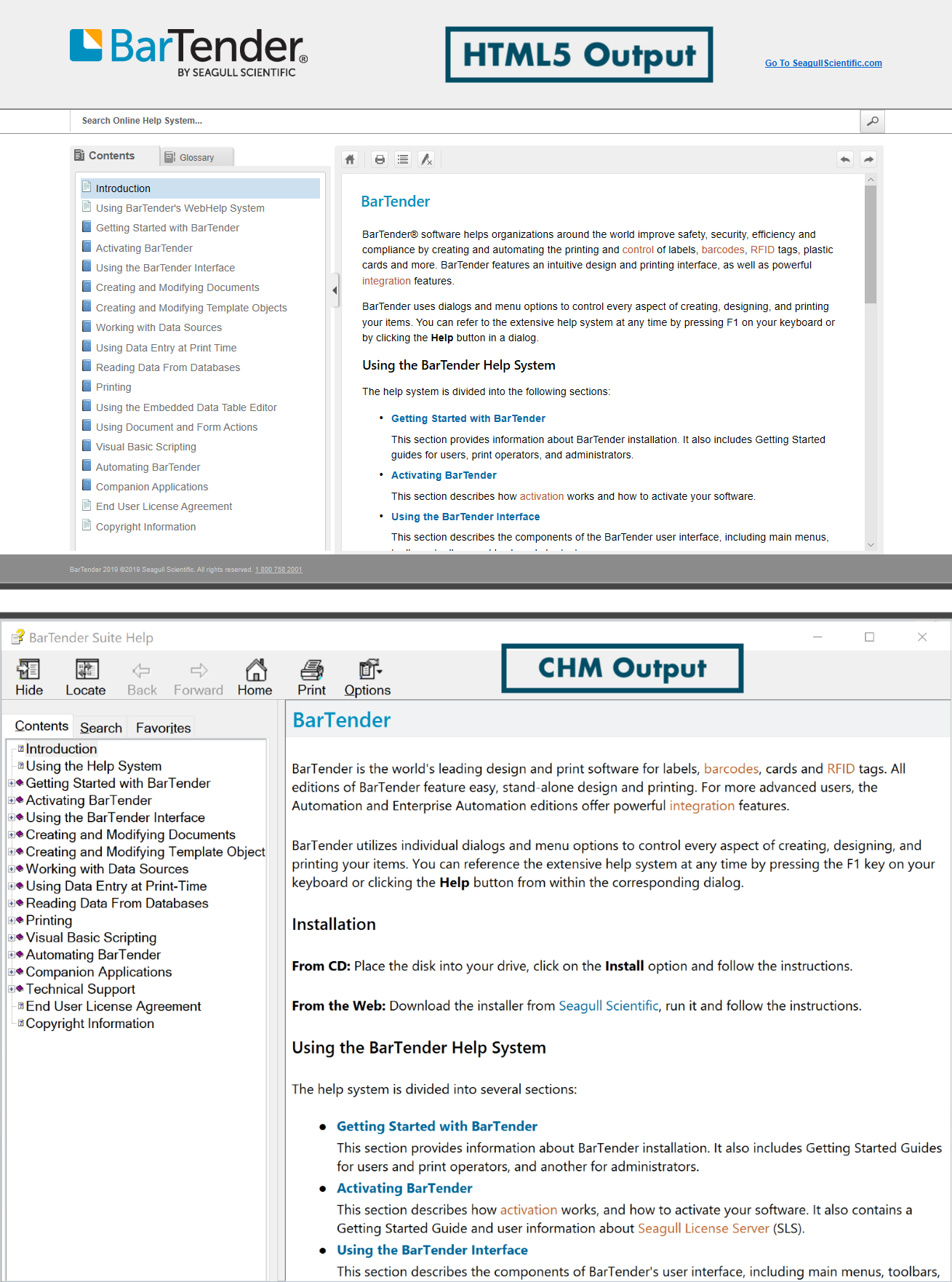
In addition to the legacy CHM output, I configured Flare to generate an online version of the help system. This required:
- Auditing source files for invalid HTML
- Building a custom theme for the online documentation (banners, colors, fonts, etc.)
- Adding a contextual glossary, so clicking a highlighted keyword displayed its definition inline, along with a standalone alphabetical glossary accessible from the main interface
- Optimizing the web output for desktop, tablet, and mobile users
Step 5: Set up MadCap Lingo for translations
BarTender's documentation is translated into 5 primary and 12 secondary languages. Our MadCap license included Lingo, which offered a more streamlined translation workflow, but Lingo couldn't read our existing language dictionaries.
To resolve this, I worked with our translation vendors to integrate SDL Trados, our previous vendor's platform, with Lingo, so Lingo could reference the existing dictionaries for localization. Content that didn't migrate cleanly was manually re-entered into Lingo (this was well before AI-assisted tools were available). Between multiple vendors, inconsistent translations for the same phrases, and the dictionary migration itself, this process took several years to fully resolve.
Once complete, we had an automated pipeline: Lingo processed files directly from a connected Flare project and delivered translated output seamlessly.
Screenshots
Migrating the BarTender help to MadCap was part of a larger internal initiative focused on improving knowledge access and collaboration. While the help system isn’t publicly available, I’d be happy to talk through my approach, goals, and outcomes in more detail.
The following screenshots demonstrate each of the outputs using MadCap Flare.
Back to Portfolio